
- Сообщений: 475
- Спасибо получено: 77
[VXA] Ultimate Force - Unleashed Power
- SaretOdin-Sol
-
 Автор темы
- Не в сети
- Просветлённый
-

- Жизнь - не игра...Хотя кого это колышет?
Скрыть
Больше
16 года 3 дн. назад #35873
от SaretOdin-Sol


SaretOdin-Sol ответил в теме [VX]Ultimate Force - Unleashed Power
nii_chan, есть еще порох в пороховницах. Будь уверен.
Пожалуйста Войти или Регистрация, чтобы присоединиться к беседе.


16 года 3 дн. назад #35874
от CapeH
CapeH ответил в теме [VX]Ultimate Force - Unleashed Power
Эммм...вот собсно, а нельзя ли выкладывать ролики, демки и подобного рода деняния с наличаем в корневых папках всех нужных для запуска RTP так как у неопытных пользователей данных приблуд неимеется ( как и у меня) поэтому невозможно заценить это "шедевральное" творение.
Ну и конечно если у пользователя нет установленного мейкера тоже нельзя посмотреть что прискорбно
"RPGVX RTP is not found"
Ну и конечно если у пользователя нет установленного мейкера тоже нельзя посмотреть что прискорбно
"RPGVX RTP is not found"
Пожалуйста Войти или Регистрация, чтобы присоединиться к беседе.
- SaretOdin-Sol
-
Автор темы
- Не в сети
- Просветлённый
-
- Жизнь - не игра...Хотя кого это колышет?
Скрыть
Больше
- Сообщений: 475
- Спасибо получено: 77
16 года 3 дн. назад #35875
от SaretOdin-Sol
SaretOdin-Sol ответил в теме [VX]Ultimate Force - Unleashed Power
Хммм...Да. Этого я не учел. Ок. Сегодня выложу с РТП.
Спасибо сказали: CapeH
Пожалуйста Войти или Регистрация, чтобы присоединиться к беседе.
- Desperate Egoist
-

- Не в сети
- Мастер
-

- Оценить?
Скрыть
Больше
- Сообщений: 125
- Спасибо получено: 9
16 года 3 дн. назад #35877
от Desperate Egoist

Desperate Egoist ответил в теме [VX]Ultimate Force - Unleashed Power
Разбираю скринчик 

*Ушел качать трейлер*
*Ушел качать трейлер*
Пожалуйста Войти или Регистрация, чтобы присоединиться к беседе.
- Desperate Egoist
-
- Не в сети
- Мастер
-
- Оценить?
Скрыть
Больше
- Сообщений: 125
- Спасибо получено: 9
16 года 3 дн. назад #35879
от Desperate Egoist
Desperate Egoist ответил в теме [VX]Ultimate Force - Unleashed Power
Посмотрел трейлер, да много тебе еще работы, так что не буду обращать внимания на графическое офрмление 
Пожалуйста Войти или Регистрация, чтобы присоединиться к беседе.
- SaretOdin-Sol
-
Автор темы
- Не в сети
- Просветлённый
-
- Жизнь - не игра...Хотя кого это колышет?
Скрыть
Больше
- Сообщений: 475
- Спасибо получено: 77
16 года 3 дн. назад - 16 года 3 дн. назад #35881
от SaretOdin-Sol
SaretOdin-Sol ответил в теме [VX]Ultimate Force - Unleashed Power
По нестильно: дело вкуса.
Почему жопой? Это скрипт от modern algebra Animated Sprites instead of Faces in scenes. Рядом с лицами игроков на месте ходят соответственно игроки в 4 направлениях.
Че эта? Это "бордюр" как в меню 9 финалки. Советую ознакомиться для общего развития.
Комбинатор: Взято из Диссидии.
CapeH, я выложил РТП. Смотри первый пост.
Почему жопой? Это скрипт от modern algebra Animated Sprites instead of Faces in scenes. Рядом с лицами игроков на месте ходят соответственно игроки в 4 направлениях.
Че эта? Это "бордюр" как в меню 9 финалки. Советую ознакомиться для общего развития.
Комбинатор: Взято из Диссидии.
CapeH, я выложил РТП. Смотри первый пост.
Последнее редактирование: 16 года 3 дн. назад пользователем SaretOdin-Sol.
Спасибо сказали: CapeH
Пожалуйста Войти или Регистрация, чтобы присоединиться к беседе.
- Desperate Egoist
-
- Не в сети
- Мастер
-
- Оценить?
Скрыть
Больше
- Сообщений: 125
- Спасибо получено: 9
16 года 3 дн. назад #35883
от Desperate Egoist
2. Ну хотя бы вместе двигались, а не сначала один влево, другой вправо и т.д
3. В FF9 я играл раз 20, и вот покажи мне где этот бордюр?
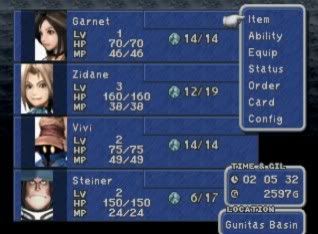
4. Ок
З.Ы. Если нравится меню из FF9 мог бы использовать скрипт BigEd'a.
Desperate Egoist ответил в теме [VX]Ultimate Force - Unleashed Power
1. СогласенSaretOdin-Sol пишет: По нестильно: дело вкуса.
Почему жопой? Это скрипт от modern algebra Animated Sprites instead of Faces in scenes. Рядом с лицами игроков на месте ходят соответственно игроки в 4 направлениях.
Че эта? Это "бордюр" как в меню 9 финалки. Советую ознакомиться для общего развития.
Комбинатор: Взято из Диссидии.
2. Ну хотя бы вместе двигались, а не сначала один влево, другой вправо и т.д
3. В FF9 я играл раз 20, и вот покажи мне где этот бордюр?
4. Ок
З.Ы. Если нравится меню из FF9 мог бы использовать скрипт BigEd'a.
Пожалуйста Войти или Регистрация, чтобы присоединиться к беседе.

16 года 2 дн. назад #35884
от nii_chan
nii_chan ответил в теме [VX]Ultimate Force - Unleashed Power
Трейлер хороший, это факт. Псих, который хочет заполучить могущественную силу, и герой, который пытается его остановить. Но не может. Когда следующий будет? И еще, пока не забыл: после многоточия ВСЕГДА ставь ПРОПУСК (пробiл). Это все 
Спасибо сказали: SaretOdin-Sol
Пожалуйста Войти или Регистрация, чтобы присоединиться к беседе.
16 года 2 дн. назад - 16 года 2 дн. назад #35885
от CapeH
CapeH ответил в теме [VX]Ultimate Force - Unleashed Power
Не знаю как вам но на мой взгляд довольно таки прикольно, просто видел игры на мейкере от которых так и тянет
б...........ть, здесь же неплохо сделано и виден "запал". Желаю удачи в дальнейшей разработке проекта.
P.S. Ну и конечно же не стоит придираться так уж сильно, если разработчик сделал так. Это всётаки его проект и его выбор
Не нравится -> делаем лучше
б...........ть, здесь же неплохо сделано и виден "запал". Желаю удачи в дальнейшей разработке проекта.
P.S. Ну и конечно же не стоит придираться так уж сильно, если разработчик сделал так. Это всётаки его проект и его выбор
Не нравится -> делаем лучше
Последнее редактирование: 16 года 2 дн. назад пользователем CapeH.
Спасибо сказали: SaretOdin-Sol
Пожалуйста Войти или Регистрация, чтобы присоединиться к беседе.
- SaretOdin-Sol
-
Автор темы
- Не в сети
- Просветлённый
-
- Жизнь - не игра...Хотя кого это колышет?
Скрыть
Больше
- Сообщений: 475
- Спасибо получено: 77
16 года 2 дн. назад #35887
от SaretOdin-Sol
SaretOdin-Sol ответил в теме [VX]Ultimate Force - Unleashed Power
Ответ на пост Desperate Egoist:
2. Лучше тебе самому испробовать этот скрипт, чтобы увидеть его работу. Мои слова, похоже, недойдут.
3. Давно позабыл фф9... И потом, ты знаешь еще скрипт с меню фф9? Помоему, он только у бигэда. И ИМЕННО ЕГО скрипт я использую. Да и что ты так прицепился к этому бордюру?
Ответ на пост nii_chan:
На счет многоточия: учтем. Следующий трейлер?...Хммм...Я подумывал над этим...Посветив его второй ипостасии игры: "кашу" из героев. Думаю, второму трейлеру быть. Осталось только придумать, что будет в этом трейлере.
Ответ на пост СареН: Благодарю за ваши пожелания! А за P.S. ---ОГРОМНЫЙ РЕСПЕКТ---
2. Лучше тебе самому испробовать этот скрипт, чтобы увидеть его работу. Мои слова, похоже, недойдут.
3. Давно позабыл фф9... И потом, ты знаешь еще скрипт с меню фф9? Помоему, он только у бигэда. И ИМЕННО ЕГО скрипт я использую. Да и что ты так прицепился к этому бордюру?
Ответ на пост nii_chan:
На счет многоточия: учтем. Следующий трейлер?...Хммм...Я подумывал над этим...Посветив его второй ипостасии игры: "кашу" из героев. Думаю, второму трейлеру быть. Осталось только придумать, что будет в этом трейлере.
Ответ на пост СареН: Благодарю за ваши пожелания! А за P.S. ---ОГРОМНЫЙ РЕСПЕКТ---
Пожалуйста Войти или Регистрация, чтобы присоединиться к беседе.


16 года 2 дн. назад - 16 года 2 дн. назад #35888
от dark32
Тьма, тьма, и ничего кроме тьмы...

ПОМОГИТЕ!!! или как быстро получить бан!
dark32 ответил в теме [VX]Ultimate Force - Unleashed Power
к SaretOdin-Sol:
1. До меня тоже не доходит суть скрипта, выложи его (скрипт) отдельно, а то странно всё выгладит на скриншоте: чарсеты спиной, синий бордюр за портретом.
2. Скрипт меню в стиле чего угодно или вообще своём стиле можно сделать за день, при наличие графики. Да хоть тот же Эгоист показывал мне более приятные менюшки на VX
P.S. сделай зеркало, я, к примеру, не могу качать с депозита.
1. До меня тоже не доходит суть скрипта, выложи его (скрипт) отдельно, а то странно всё выгладит на скриншоте: чарсеты спиной, синий бордюр за портретом.
2. Скрипт меню в стиле чего угодно или вообще своём стиле можно сделать за день, при наличие графики. Да хоть тот же Эгоист показывал мне более приятные менюшки на VX
P.S. сделай зеркало, я, к примеру, не могу качать с депозита.
Тьма, тьма, и ничего кроме тьмы...
ПОМОГИТЕ!!! или как быстро получить бан!
Последнее редактирование: 16 года 2 дн. назад пользователем dark32.
Пожалуйста Войти или Регистрация, чтобы присоединиться к беседе.
16 года 2 дн. назад - 16 года 2 дн. назад #35889
от dark32
Тьма, тьма, и ничего кроме тьмы...
ПОМОГИТЕ!!! или как быстро получить бан!
dark32 ответил в теме [VX]Ultimate Force - Unleashed Power
1. на сколько мне известно - мейкер не поддерживает аппаратное ускорение, поэтому заставка с nVidia - не имеет смысла
2. хорошо бы в начальном ролике немного убавить музыку и сделать эффекты
3. фейковая загрузка порадовала
2. хорошо бы в начальном ролике немного убавить музыку и сделать эффекты
3. фейковая загрузка порадовала
Тьма, тьма, и ничего кроме тьмы...
ПОМОГИТЕ!!! или как быстро получить бан!
Последнее редактирование: 16 года 2 дн. назад пользователем dark32.
Спасибо сказали: SaretOdin-Sol
Пожалуйста Войти или Регистрация, чтобы присоединиться к беседе.
- SaretOdin-Sol
-
Автор темы
- Не в сети
- Просветлённый
-
- Жизнь - не игра...Хотя кого это колышет?
Скрыть
Больше
- Сообщений: 475
- Спасибо получено: 77
16 года 2 дн. назад - 16 года 2 дн. назад #35890
от SaretOdin-Sol
SaretOdin-Sol ответил в теме [VX]Ultimate Force - Unleashed Power
Скрипт Для движения чаров в меню:
Скрипт меню 9 финалки:
Зеркало седня сделаю.(Немного интересно: если вы не можете скачать с депозита, откуда вы смогли посмотреть трейлер?)
Заставка с инвидия просто так. Я сделал так, чтоб игра была "более похожа" на игру.
В начальном ролике...Это в каком? До меню, меню, трейлер. В каком именно промежутке?
ВНИМАНИЕ: Спойлер!
#==============================================================================
# Animated Sprites instead of Faces in scenes.
# Version: 1.0
# Author: modern algebra (rmrk.net)
# Date: February 19, 2010
#++++++++++++++++++++++++++++++++++++++++++++++++++++++++++++++++++++++++++++++
# Description:
#
# This script allows you to draw an actor's sprite in any scene that already
# draws the actor's face. You can either use it to supplement the face
# graphic or replace the face graphic altogether. For each scene where you
# choose to use this feature, you can configure a number of options, such as
# where the sprite will show up (in relation to the face graphic), whether or
# not the face will also be drawn, what pose the sprite will start in,
# whether it will be animated, whether it will change directions (and if so,
# over what time interval), and if subsequently drawn sprites should be drawn
# in a different pose.
#++++++++++++++++++++++++++++++++++++++++++++++++++++++++++++++++++++++++++++++
# Instructions:
#
# Place this script in its own slot below Materials and above Main in the
# Script Editor (F11).
#
# To add a scene and configure how the sprites will show up in it, read the
# instructions in the EDITABLE REGION at line 30 very carefully.
#==============================================================================
ASF_CONFIGURATION = {
#\\\\\\\\\\\\\\\\\\\\\\\\\\\\\\\\\\\\\\\\\\\\\\\\\\\\\\\\\\\\\\\\\\\\\\\\\\\\
# EDITABLE REGION
#````````````````````````````````````````````````````````````````````````````
# For each scene that you want the faces to be replaced (or supplemented) by
# sprites, set up an entry as follows (values are default), omitting any that
# you want to be default (pay attention to commas and curly brackets):
#
# Scene_X => {
# :x_offset => 0,
# :y_offset => 0,
# :remove_face => false,
# :default_start_pose => 0,
# :alternate_start_pose => false,
# :change_directions => false,
# :direction_frames => 120,
# :animate_sprites => false,
# :move_speed => 4
# }
#
# where:
# Scene_X ~ the name of the scene. eg Scene_Menu; Scene_Battle; Scene_Name
# :x_offset ~ an integer, representing how many pixels left or right it
# should be moved from the center of where the face would be drawn.
# Positive numbers will be drawn right of that, and negative numbers drawn
# left of that. If excluded, it defaults to 0.
# :y_offset ~ an integer, representing how many pixels up or down it should
# be moved from the bottom of where the face would be drawn. If negative,
# it will be drawn higher and if positive, it will be drawn lower. If
# excluded, it defaults to 0.
# :remove_face ~ a boolean. If true, the face won't be drawn. If false, the
# face will be drawn along with the sprite. Defaults to false.
# :default_start_pose ~ an integer, 0-3. This is the starting pose of the
# first drawn sprite. 0 => Down; 1 => Right; 2 => Up; 3 => Left. If
# excluded, defaults to 0.
# :alternate_start_pose ~ a boolean. If true, then each time a new sprite
# is drawn, its start position will differ. So, if you have three actor
# sprites are being drawn, and the default start pose is 0 (Down), then
# the first sprite would start facing down, the second sprite would
# start facing Right, and the third sprite would start facing Up. If
# excluded, defaults to false
# :change_directions ~ a boolean. If true, the sprites would change
# over the time interval set in :direction_frames. If false, the sprites
# will only face one direction for the duration of the scene. If excluded,
# defaults to false
# :direction_frames ~ an integer. If :change_directions is true, this
# integer will determine the number of frames before the sprite changes
# direction. 60 frames = 1 second. If excluded, defaults to 120.
# :animate_sprites ~ a boolean. If true, the sprites will be shown walking.
# If false, they will remain stationary. If excluded, defaults to false.
# :move_speed ~ an integer, 1-6. If :animate_sprites is true, this is
# the speed that the sprite will be animating. 1 is the slowest and 6 is
# the fastest. Defaults to 4
#
# If you get a syntax error when test playing your game, you most likely
# forgot to put a comma or curly bracket in. If you set up entries for more
# than one scene, you need to put a comma after each } except for the last
# entry. For all of the attributes you specify in each scene entry, you need
# a comma after the value except for the last entry.
#||||||||||||||||||||||||||||||||||||||||||||||||||||||||||||||||||||||||||||
Scene_Menu => {
:x_offset => -32,
:y_offset => 0,
:remove_face => false,
:default_start_pose => 0,
:alternate_start_pose => true,
:animate_sprites => true,
:move_speed => 1,
:change_directions => true,
:direction_frames => 120
},
Scene_Status => {
:x_offset => 0,
:y_offset => -32,
:remove_face => true,
:default_start_pose => 0,
:animate_sprites => true
}
#||||||||||||||||||||||||||||||||||||||||||||||||||||||||||||||||||||||||||||
# END EDITABLE REGION
#////////////////////////////////////////////////////////////////////////////
}
#==============================================================================
# ** Bitmap
#++++++++++++++++++++++++++++++++++++++++++++++++++++++++++++++++++++++++++++++
# Summary of Changes:
# new attr_accessor - asf_just_cleared
# aliased method - clear
#==============================================================================
class Bitmap
#~~~~~~~~~~~~~~~~~~~~~~~~~~~~~~~~~~~~~~~~~~~~~~~~~~~~~~~~~~~~~~~~~~~~~~~~~~
# * Public Instance Variable
#~~~~~~~~~~~~~~~~~~~~~~~~~~~~~~~~~~~~~~~~~~~~~~~~~~~~~~~~~~~~~~~~~~~~~~~~~~
attr_accessor :asf_just_cleared
#~~~~~~~~~~~~~~~~~~~~~~~~~~~~~~~~~~~~~~~~~~~~~~~~~~~~~~~~~~~~~~~~~~~~~~~~~~
# * Clear
#~~~~~~~~~~~~~~~~~~~~~~~~~~~~~~~~~~~~~~~~~~~~~~~~~~~~~~~~~~~~~~~~~~~~~~~~~~
alias mala_wlksprtmnu_clr_2gc1 clear unless self.method_defined? (:mala_wlksprtmnu_clr_2gc1)
def clear (*args)
mala_wlksprtmnu_clr_2gc1 (*args) # Run Original Method
@asf_just_cleared = true
end
end
#==============================================================================
# ** Game_Character
#++++++++++++++++++++++++++++++++++++++++++++++++++++++++++++++++++++++++++++++
# Compatibility patch for Composite Characters
#==============================================================================
class Game_Character
attr_writer :composite_character if self.method_defined? (:composite_character)
end
#==============================================================================
# ** Sprite_MenuActor
#++++++++++++++++++++++++++++++++++++++++++++++++++++++++++++++++++++++++++++++
# This window displays the walking sprite of an actor.
#==============================================================================
class Sprite_MenuActor < Sprite_Character
#~~~~~~~~~~~~~~~~~~~~~~~~~~~~~~~~~~~~~~~~~~~~~~~~~~~~~~~~~~~~~~~~~~~~~~~~~~
# * Object Initialization
#~~~~~~~~~~~~~~~~~~~~~~~~~~~~~~~~~~~~~~~~~~~~~~~~~~~~~~~~~~~~~~~~~~~~~~~~~~
def initialize (actor_id, x, y, dir, config, viewport = nil)
@frame_count = 0
@change_direction, @asf_animation = config[:change_directions], config[:animate_sprites]
@direction_frames = config[:direction_frames].is_a? (Integer) ? config[:direction_frames] : 120
actor = $game_actors[actor_id]
character = Game_Character.new
# Set to composite character if that script exists.
if character.methods.include? ("composite_character")
character.composite_character = actor.composite_character
else
character.set_graphic (actor.character_name, actor.character_index)
end
super (viewport, character)
self.x, self.y = x, y
case dir
when 1 then @character.turn_right
when 2 then @character.turn_up
when 3 then @character.turn_left
end
# Change Speed and Frequency of the Sprite
freq = config[:move_speed] ? config[:move_speed] : 4
move_route = RPG::MoveRoute.new
move_route.list.unshift (RPG::MoveCommand.new (29, [freq]))
@character.force_move_route (move_route)
update_bitmap
update
end
#~~~~~~~~~~~~~~~~~~~~~~~~~~~~~~~~~~~~~~~~~~~~~~~~~~~~~~~~~~~~~~~~~~~~~~~~~~
# * Frame Update
#~~~~~~~~~~~~~~~~~~~~~~~~~~~~~~~~~~~~~~~~~~~~~~~~~~~~~~~~~~~~~~~~~~~~~~~~~~
def update
# Turn at user-specified intervals
if @change_direction
if @frame_count >= @direction_frames
@character.turn_right_90
@frame_count = 0
end
@frame_count += 1
end
if @asf_animation
@character.update_move
@character.update_animation
end
update_src_rect
end
end
#==============================================================================
# ** Window_Base
#++++++++++++++++++++++++++++++++++++++++++++++++++++++++++++++++++++++++++++++
# Summary of Changes:
# aliased methods - initialize, update, dispose, draw_actor_face
# new methods - dispose_walking_sprites
#==============================================================================
class Window_Base
#~~~~~~~~~~~~~~~~~~~~~~~~~~~~~~~~~~~~~~~~~~~~~~~~~~~~~~~~~~~~~~~~~~~~~~~~~~
# * Object Initialization
#~~~~~~~~~~~~~~~~~~~~~~~~~~~~~~~~~~~~~~~~~~~~~~~~~~~~~~~~~~~~~~~~~~~~~~~~~~
alias ma_asf_init_wlkng_7jk2 initialize
def initialize (*args)
@ma_walking_sprites = []
ma_asf_init_wlkng_7jk2 (*args) # Run Original Method
end
#~~~~~~~~~~~~~~~~~~~~~~~~~~~~~~~~~~~~~~~~~~~~~~~~~~~~~~~~~~~~~~~~~~~~~~~~~~
# * Dispose
#~~~~~~~~~~~~~~~~~~~~~~~~~~~~~~~~~~~~~~~~~~~~~~~~~~~~~~~~~~~~~~~~~~~~~~~~~~
alias malgba_wlksprts_disps_5yu2 dispose
def dispose (*args)
@ma_walking_sprites.each { |sprite| sprite.dispose }
@ma_walking_sprites.clear
malgba_wlksprts_disps_5yu2 (*args) # Run Original Method
end
#~~~~~~~~~~~~~~~~~~~~~~~~~~~~~~~~~~~~~~~~~~~~~~~~~~~~~~~~~~~~~~~~~~~~~~~~~~
# * Frame Update
#~~~~~~~~~~~~~~~~~~~~~~~~~~~~~~~~~~~~~~~~~~~~~~~~~~~~~~~~~~~~~~~~~~~~~~~~~~
alias mrnalb_sprtwlk_updt_7uj2 update
def update (*args)
# Dispose all sprites if bitmap recently cleared and new faces not drawn
if self.contents.asf_just_cleared
@ma_walking_sprites.each { |sprite| sprite.dispose }
@ma_walking_sprites.clear
self.contents.asf_just_cleared = false
end
# Check if contents have scrolled
x_plus, y_plus = 0, 0
if @asf_scroll_x != self.ox
@asf_scroll_x = 0 unless @asf_scroll_x
x_plus += (@asf_scroll_x - self.ox)
@asf_scroll_x = self.ox
end
if @asf_scroll_y != self.oy
@asf_scroll_y = 0 unless @asf_scroll_y
y_plus += (@asf_scroll_y - self.oy)
@asf_scroll_y = self.oy
end
@ma_walking_sprites.each { |sprite|
sprite.update
# Scroll if contents have scrolled.
sprite.x += x_plus
sprite.y += y_plus
}
mrnalb_sprtwlk_updt_7uj2 (*args) # Run Original Method
end
#~~~~~~~~~~~~~~~~~~~~~~~~~~~~~~~~~~~~~~~~~~~~~~~~~~~~~~~~~~~~~~~~~~~~~~~~~~
# * Draw Actor Face Graphic
#~~~~~~~~~~~~~~~~~~~~~~~~~~~~~~~~~~~~~~~~~~~~~~~~~~~~~~~~~~~~~~~~~~~~~~~~~~
alias malg_drwactrface_spritereplce_6uj2 draw_actor_face
def draw_actor_face(actor, x, y, size = 96, *args)
# If scene is specified to replace the face graphic
if ASF_CONFIGURATION.keys.include? ($scene.class)
# Dispose all sprites if bitmap recently cleared
if self.contents.asf_just_cleared
@ma_walking_sprites.each { |sprite| sprite.dispose }
@ma_walking_sprites.clear
self.contents.asf_just_cleared = false
end
config = ASF_CONFIGURATION[$scene.class]
malg_drwactrface_spritereplce_6uj2 (actor, x, y, size, *args) unless config[:remove_face]
# Get offset
x_off = config[:x_offset] ? config[:x_offset] : 0
y_off = config[:y_offset] ? config[:y_offset] : 0
sx = x + (size / 2) + x_off
sy = y + size + y_off
pose = config[:default_start_pose] ? config[:default_start_pose] : 0
dir = config[:alternate_start_pose] ? @ma_walking_sprites.size % 4 : pose
# Create Sprite
viewport = Viewport.new (self.x + 16, self.y + 16, contents.width, contents.height)
viewport.z = self.z + 50
viewport.z += self.viewport.z if self.viewport
sprite = Sprite_MenuActor.new (actor.id, sx, sy, dir, config, viewport)
@ma_walking_sprites.push (sprite)
else
# Draw face if scene not affected
malg_drwactrface_spritereplce_6uj2 (actor, x, y, size, *args)
end
end
end
# Animated Sprites instead of Faces in scenes.
# Version: 1.0
# Author: modern algebra (rmrk.net)
# Date: February 19, 2010
#++++++++++++++++++++++++++++++++++++++++++++++++++++++++++++++++++++++++++++++
# Description:
#
# This script allows you to draw an actor's sprite in any scene that already
# draws the actor's face. You can either use it to supplement the face
# graphic or replace the face graphic altogether. For each scene where you
# choose to use this feature, you can configure a number of options, such as
# where the sprite will show up (in relation to the face graphic), whether or
# not the face will also be drawn, what pose the sprite will start in,
# whether it will be animated, whether it will change directions (and if so,
# over what time interval), and if subsequently drawn sprites should be drawn
# in a different pose.
#++++++++++++++++++++++++++++++++++++++++++++++++++++++++++++++++++++++++++++++
# Instructions:
#
# Place this script in its own slot below Materials and above Main in the
# Script Editor (F11).
#
# To add a scene and configure how the sprites will show up in it, read the
# instructions in the EDITABLE REGION at line 30 very carefully.
#==============================================================================
ASF_CONFIGURATION = {
#\\\\\\\\\\\\\\\\\\\\\\\\\\\\\\\\\\\\\\\\\\\\\\\\\\\\\\\\\\\\\\\\\\\\\\\\\\\\
# EDITABLE REGION
#````````````````````````````````````````````````````````````````````````````
# For each scene that you want the faces to be replaced (or supplemented) by
# sprites, set up an entry as follows (values are default), omitting any that
# you want to be default (pay attention to commas and curly brackets):
#
# Scene_X => {
# :x_offset => 0,
# :y_offset => 0,
# :remove_face => false,
# :default_start_pose => 0,
# :alternate_start_pose => false,
# :change_directions => false,
# :direction_frames => 120,
# :animate_sprites => false,
# :move_speed => 4
# }
#
# where:
# Scene_X ~ the name of the scene. eg Scene_Menu; Scene_Battle; Scene_Name
# :x_offset ~ an integer, representing how many pixels left or right it
# should be moved from the center of where the face would be drawn.
# Positive numbers will be drawn right of that, and negative numbers drawn
# left of that. If excluded, it defaults to 0.
# :y_offset ~ an integer, representing how many pixels up or down it should
# be moved from the bottom of where the face would be drawn. If negative,
# it will be drawn higher and if positive, it will be drawn lower. If
# excluded, it defaults to 0.
# :remove_face ~ a boolean. If true, the face won't be drawn. If false, the
# face will be drawn along with the sprite. Defaults to false.
# :default_start_pose ~ an integer, 0-3. This is the starting pose of the
# first drawn sprite. 0 => Down; 1 => Right; 2 => Up; 3 => Left. If
# excluded, defaults to 0.
# :alternate_start_pose ~ a boolean. If true, then each time a new sprite
# is drawn, its start position will differ. So, if you have three actor
# sprites are being drawn, and the default start pose is 0 (Down), then
# the first sprite would start facing down, the second sprite would
# start facing Right, and the third sprite would start facing Up. If
# excluded, defaults to false
# :change_directions ~ a boolean. If true, the sprites would change
# over the time interval set in :direction_frames. If false, the sprites
# will only face one direction for the duration of the scene. If excluded,
# defaults to false
# :direction_frames ~ an integer. If :change_directions is true, this
# integer will determine the number of frames before the sprite changes
# direction. 60 frames = 1 second. If excluded, defaults to 120.
# :animate_sprites ~ a boolean. If true, the sprites will be shown walking.
# If false, they will remain stationary. If excluded, defaults to false.
# :move_speed ~ an integer, 1-6. If :animate_sprites is true, this is
# the speed that the sprite will be animating. 1 is the slowest and 6 is
# the fastest. Defaults to 4
#
# If you get a syntax error when test playing your game, you most likely
# forgot to put a comma or curly bracket in. If you set up entries for more
# than one scene, you need to put a comma after each } except for the last
# entry. For all of the attributes you specify in each scene entry, you need
# a comma after the value except for the last entry.
#||||||||||||||||||||||||||||||||||||||||||||||||||||||||||||||||||||||||||||
Scene_Menu => {
:x_offset => -32,
:y_offset => 0,
:remove_face => false,
:default_start_pose => 0,
:alternate_start_pose => true,
:animate_sprites => true,
:move_speed => 1,
:change_directions => true,
:direction_frames => 120
},
Scene_Status => {
:x_offset => 0,
:y_offset => -32,
:remove_face => true,
:default_start_pose => 0,
:animate_sprites => true
}
#||||||||||||||||||||||||||||||||||||||||||||||||||||||||||||||||||||||||||||
# END EDITABLE REGION
#////////////////////////////////////////////////////////////////////////////
}
#==============================================================================
# ** Bitmap
#++++++++++++++++++++++++++++++++++++++++++++++++++++++++++++++++++++++++++++++
# Summary of Changes:
# new attr_accessor - asf_just_cleared
# aliased method - clear
#==============================================================================
class Bitmap
#~~~~~~~~~~~~~~~~~~~~~~~~~~~~~~~~~~~~~~~~~~~~~~~~~~~~~~~~~~~~~~~~~~~~~~~~~~
# * Public Instance Variable
#~~~~~~~~~~~~~~~~~~~~~~~~~~~~~~~~~~~~~~~~~~~~~~~~~~~~~~~~~~~~~~~~~~~~~~~~~~
attr_accessor :asf_just_cleared
#~~~~~~~~~~~~~~~~~~~~~~~~~~~~~~~~~~~~~~~~~~~~~~~~~~~~~~~~~~~~~~~~~~~~~~~~~~
# * Clear
#~~~~~~~~~~~~~~~~~~~~~~~~~~~~~~~~~~~~~~~~~~~~~~~~~~~~~~~~~~~~~~~~~~~~~~~~~~
alias mala_wlksprtmnu_clr_2gc1 clear unless self.method_defined? (:mala_wlksprtmnu_clr_2gc1)
def clear (*args)
mala_wlksprtmnu_clr_2gc1 (*args) # Run Original Method
@asf_just_cleared = true
end
end
#==============================================================================
# ** Game_Character
#++++++++++++++++++++++++++++++++++++++++++++++++++++++++++++++++++++++++++++++
# Compatibility patch for Composite Characters
#==============================================================================
class Game_Character
attr_writer :composite_character if self.method_defined? (:composite_character)
end
#==============================================================================
# ** Sprite_MenuActor
#++++++++++++++++++++++++++++++++++++++++++++++++++++++++++++++++++++++++++++++
# This window displays the walking sprite of an actor.
#==============================================================================
class Sprite_MenuActor < Sprite_Character
#~~~~~~~~~~~~~~~~~~~~~~~~~~~~~~~~~~~~~~~~~~~~~~~~~~~~~~~~~~~~~~~~~~~~~~~~~~
# * Object Initialization
#~~~~~~~~~~~~~~~~~~~~~~~~~~~~~~~~~~~~~~~~~~~~~~~~~~~~~~~~~~~~~~~~~~~~~~~~~~
def initialize (actor_id, x, y, dir, config, viewport = nil)
@frame_count = 0
@change_direction, @asf_animation = config[:change_directions], config[:animate_sprites]
@direction_frames = config[:direction_frames].is_a? (Integer) ? config[:direction_frames] : 120
actor = $game_actors[actor_id]
character = Game_Character.new
# Set to composite character if that script exists.
if character.methods.include? ("composite_character")
character.composite_character = actor.composite_character
else
character.set_graphic (actor.character_name, actor.character_index)
end
super (viewport, character)
self.x, self.y = x, y
case dir
when 1 then @character.turn_right
when 2 then @character.turn_up
when 3 then @character.turn_left
end
# Change Speed and Frequency of the Sprite
freq = config[:move_speed] ? config[:move_speed] : 4
move_route = RPG::MoveRoute.new
move_route.list.unshift (RPG::MoveCommand.new (29, [freq]))
@character.force_move_route (move_route)
update_bitmap
update
end
#~~~~~~~~~~~~~~~~~~~~~~~~~~~~~~~~~~~~~~~~~~~~~~~~~~~~~~~~~~~~~~~~~~~~~~~~~~
# * Frame Update
#~~~~~~~~~~~~~~~~~~~~~~~~~~~~~~~~~~~~~~~~~~~~~~~~~~~~~~~~~~~~~~~~~~~~~~~~~~
def update
# Turn at user-specified intervals
if @change_direction
if @frame_count >= @direction_frames
@character.turn_right_90
@frame_count = 0
end
@frame_count += 1
end
if @asf_animation
@character.update_move
@character.update_animation
end
update_src_rect
end
end
#==============================================================================
# ** Window_Base
#++++++++++++++++++++++++++++++++++++++++++++++++++++++++++++++++++++++++++++++
# Summary of Changes:
# aliased methods - initialize, update, dispose, draw_actor_face
# new methods - dispose_walking_sprites
#==============================================================================
class Window_Base
#~~~~~~~~~~~~~~~~~~~~~~~~~~~~~~~~~~~~~~~~~~~~~~~~~~~~~~~~~~~~~~~~~~~~~~~~~~
# * Object Initialization
#~~~~~~~~~~~~~~~~~~~~~~~~~~~~~~~~~~~~~~~~~~~~~~~~~~~~~~~~~~~~~~~~~~~~~~~~~~
alias ma_asf_init_wlkng_7jk2 initialize
def initialize (*args)
@ma_walking_sprites = []
ma_asf_init_wlkng_7jk2 (*args) # Run Original Method
end
#~~~~~~~~~~~~~~~~~~~~~~~~~~~~~~~~~~~~~~~~~~~~~~~~~~~~~~~~~~~~~~~~~~~~~~~~~~
# * Dispose
#~~~~~~~~~~~~~~~~~~~~~~~~~~~~~~~~~~~~~~~~~~~~~~~~~~~~~~~~~~~~~~~~~~~~~~~~~~
alias malgba_wlksprts_disps_5yu2 dispose
def dispose (*args)
@ma_walking_sprites.each { |sprite| sprite.dispose }
@ma_walking_sprites.clear
malgba_wlksprts_disps_5yu2 (*args) # Run Original Method
end
#~~~~~~~~~~~~~~~~~~~~~~~~~~~~~~~~~~~~~~~~~~~~~~~~~~~~~~~~~~~~~~~~~~~~~~~~~~
# * Frame Update
#~~~~~~~~~~~~~~~~~~~~~~~~~~~~~~~~~~~~~~~~~~~~~~~~~~~~~~~~~~~~~~~~~~~~~~~~~~
alias mrnalb_sprtwlk_updt_7uj2 update
def update (*args)
# Dispose all sprites if bitmap recently cleared and new faces not drawn
if self.contents.asf_just_cleared
@ma_walking_sprites.each { |sprite| sprite.dispose }
@ma_walking_sprites.clear
self.contents.asf_just_cleared = false
end
# Check if contents have scrolled
x_plus, y_plus = 0, 0
if @asf_scroll_x != self.ox
@asf_scroll_x = 0 unless @asf_scroll_x
x_plus += (@asf_scroll_x - self.ox)
@asf_scroll_x = self.ox
end
if @asf_scroll_y != self.oy
@asf_scroll_y = 0 unless @asf_scroll_y
y_plus += (@asf_scroll_y - self.oy)
@asf_scroll_y = self.oy
end
@ma_walking_sprites.each { |sprite|
sprite.update
# Scroll if contents have scrolled.
sprite.x += x_plus
sprite.y += y_plus
}
mrnalb_sprtwlk_updt_7uj2 (*args) # Run Original Method
end
#~~~~~~~~~~~~~~~~~~~~~~~~~~~~~~~~~~~~~~~~~~~~~~~~~~~~~~~~~~~~~~~~~~~~~~~~~~
# * Draw Actor Face Graphic
#~~~~~~~~~~~~~~~~~~~~~~~~~~~~~~~~~~~~~~~~~~~~~~~~~~~~~~~~~~~~~~~~~~~~~~~~~~
alias malg_drwactrface_spritereplce_6uj2 draw_actor_face
def draw_actor_face(actor, x, y, size = 96, *args)
# If scene is specified to replace the face graphic
if ASF_CONFIGURATION.keys.include? ($scene.class)
# Dispose all sprites if bitmap recently cleared
if self.contents.asf_just_cleared
@ma_walking_sprites.each { |sprite| sprite.dispose }
@ma_walking_sprites.clear
self.contents.asf_just_cleared = false
end
config = ASF_CONFIGURATION[$scene.class]
malg_drwactrface_spritereplce_6uj2 (actor, x, y, size, *args) unless config[:remove_face]
# Get offset
x_off = config[:x_offset] ? config[:x_offset] : 0
y_off = config[:y_offset] ? config[:y_offset] : 0
sx = x + (size / 2) + x_off
sy = y + size + y_off
pose = config[:default_start_pose] ? config[:default_start_pose] : 0
dir = config[:alternate_start_pose] ? @ma_walking_sprites.size % 4 : pose
# Create Sprite
viewport = Viewport.new (self.x + 16, self.y + 16, contents.width, contents.height)
viewport.z = self.z + 50
viewport.z += self.viewport.z if self.viewport
sprite = Sprite_MenuActor.new (actor.id, sx, sy, dir, config, viewport)
@ma_walking_sprites.push (sprite)
else
# Draw face if scene not affected
malg_drwactrface_spritereplce_6uj2 (actor, x, y, size, *args)
end
end
end
Скрипт меню 9 финалки:
ВНИМАНИЕ: Спойлер!
=begin
BigEd781' Final Fantasy IX Menu
Credit to PainHurt at rpgmakervx.net for most of the graphics
=end
module FF9_Config
# set this to 'true' if you would like to use a cusotm background image
USE_CUSTOM_BACK = false
# the name of the custom background image, without the file extension (no .png)
BACK_NAME = 'StoneBackground'
# if you set this to 'true', you must be using the enhanced
# Window class script that I posted: You can get that script here:
# www.rpgmakervx.net/index.php?showtopic=8042&hl=
# this will make the provided FF9 windowskin look really good.
USE_TILED_WINDOW = false
# When this is set to 'true', the menu cirsor will animate back and forth.
# When set to 'false', it will stay in place
ANIMATE_CURSOR = true
# When set to 'true', four background panels are always drawn.
# When set to 'false', a panel is only drawn for each party member
DRAW_FOR_ALL = true
# the name of the font used in the menu.
# use 'Font.default_name' for the default font. Try 'Centaur' for a nice, smaller font.
DEFAULT_FONT = 'Calibri'
# set this to true to enable the font above for all windows.
# also sets the back_opacity to 255 for all windows.
# I recommend setting this to 'true' to maintain a consistent look.
USE_FOR_ALL = true
# the icon id for your gold window portion of the menu, 194 by default.
GOLD_ICON_ID = 194
end
if FF9_Config::USE_FOR_ALL
Font.default_name = FF9_Config::DEFAULT_FONT
class Window_Base < Window
alias :eds_pre_ff9_menu_base_initialize :initialize
def initialize(*args)
eds_pre_ff9_menu_base_initialize(*args)
self.stretch = false if FF9_Config::USE_TILED_WINDOW
self.back_opacity = 255
end
end
end
class Window_Base < Window
CAPTION_COLOR = Color.new(255,255,255)#(228, 228, 228)
CAPTION_HEIGHT = 12
X_OFFSET = 16
Y_OFFSET = -5
alias :eds_pre_window_caption_intialize :initialize
def initialize(*args)
eds_pre_window_caption_intialize(*args)
@caption_sprite = Sprite_Base.new(self.viewport)
create_caption_bitmap(1, CAPTION_HEIGHT)
@caption_sprite.x = self.x + X_OFFSET
@caption_sprite.y = self.y + Y_OFFSET
@caption_sprite.z = self.z + 1
end
def x=(value)
super
@caption_sprite.x = value + X_OFFSET unless @caption_sprite.nil?
end
def y=(value)
super
@caption_sprite.y = value + Y_OFFSET unless @caption_sprite.nil?
end
def z=(value)
super
@caption_sprite.z = value + 1 unless @caption_sprite.nil?
end
def caption=(text)
return unless text.is_a?(String)
return if text.empty?
@caption = text
width = @caption_sprite.bitmap.text_size(@caption).width
create_caption_bitmap(width, CAPTION_HEIGHT)
draw_caption
end
def create_caption_bitmap(w, h)
@caption_sprite.bitmap = Bitmap.new(w, h)
@caption_sprite.bitmap.font.size = 12
@caption_sprite.bitmap.font.color = CAPTION_COLOR
@caption_sprite.bitmap.font.bold = true
end
def draw_caption
unless @caption.nil?
h = @caption_sprite.bitmap.height
w = @caption_sprite.bitmap.width
rect = Rect.new( 0, h / 2, w, h / 4 )
@caption_sprite.bitmap.fill_rect(rect, Color.new(0, 0, 0, 96))
@caption_sprite.bitmap.draw_text(@caption_sprite.src_rect, @caption)
end
end
alias :eds_pre_caption_window_dispose :dispose
def dispose
eds_pre_caption_window_dispose
@caption_sprite.dispose
end
def find_window_width(text)
return Bitmap.new(544, 416).text_size(text).width + 32
end
end
class Window_TimeGold < Window_Base
def initialize(x, y)
width = find_window_width("9999999")
width = 140 if width < 140
super(x, y, width, WLH + 58)
self.back_opacity = 255
self.stretch = false if FF9_Config::USE_TILED_WINDOW
self.contents.font.name = FF9_Config::DEFAULT_FONT
self.caption = "TIME & #{Vocab.gold}"
@time_icon = Cache.picture('Timer')
@intern_frame_count = 0
refresh
end
def draw_time
sec = (Graphics.frame_count / 60) % 60
min = (Graphics.frame_count / 3600) % 60
hrs = Graphics.frame_count / 216000
self.contents.font.color = Color.new(255, 255, 255)
time = "%02d:%02d:%02d" % [hrs, min, sec]
self.contents.draw_text(0, 0, self.contents.width, WLH, time, 2)
end
def refresh
self.contents.clear
self.contents.blt(0, 0, @time_icon, @time_icon.rect)
draw_icon(FF9_Config::GOLD_ICON_ID, 2, WLH)
draw_currency_value($game_party.gold, 0, WLH, self.contents.width)
draw_time
end
def draw_currency_value(value, x, y, width)
gold_text = Vocab.gold
cx = contents.text_size(gold_text[0,1]).width
self.contents.font.color = normal_color
self.contents.draw_text(x, y, width - cx - 2, WLH, value, 2)
self.contents.font.color = system_color
# just print the first character of Vocab::gold
self.contents.draw_text(x, y, width, WLH, gold_text[0,1], 2)
end
def update
super
@intern_frame_count += 1
return if (@intern_frame_count % 60) != 0
refresh
end
def find_window_width(text)
return Bitmap.new(544, 416).text_size(text).width + 80
end
end
class Window_MenuLocation < Window_Base
def initialize(x, y)
@map_name = load_data("Data/MapInfos.rvdata")[$game_map.map_id].name
width = find_window_width(@map_name)
super(x, y, width, WLH + 32)
self.stretch = false if FF9_Config::USE_TILED_WINDOW
self.contents.font.name = FF9_Config::DEFAULT_FONT
self.back_opacity = 255
self.caption = "LOCATION"
refresh
end
def refresh
self.contents.clear
self.contents.draw_text(0, 0, self.contents.width, WLH, @map_name, 1)
end
def find_window_width(text)
return Bitmap.new(544, 416).text_size(text).width + 48
end
end
class Window_Command < Window_Selectable
alias :eds_pre_ff9_menu_win_command_init :initialize
def initialize(*args)
@font_name = Font.default_name
eds_pre_ff9_menu_win_command_init(*args)
end
#
# * OVERWRITTEN
#
def refresh
self.contents.clear
self.contents.font.name = @font_name
for i in 0...@item_max
draw_item(i)
end
end
def font_name=(name)
@font_name = name
end
end
class Window_Uses < Window_Base
def initialize(right, y, item)
@remaining_text = "Remaining: #{$game_party.item_number(item)}"
w = 160
x = right ? (544 - w) : 0
super(x, y, w, WLH + 32)
self.stretch = false if FF9_Config::USE_TILED_WINDOW
self.contents.font.name = FF9_Config::DEFAULT_FONT
refresh
end
def item=(item)
return unless item.is_a?(RPG::Item)
@remaining_text = "Remaining: #{$game_party.item_number(item)}"
refresh
end
def visible=(value)
super
refresh if value
end
def refresh
self.contents.clear
self.contents.draw_text(self.contents.rect, @remaining_text, 1)
end
end
class Window_SkillUses < Window_Base
def initialize(right, y, actor, skill)
@remaining_text = make_info_string(actor, skill)
w = 182
x = right ? (544 - w) : 0
super(x, y, w, WLH + 32)
self.stretch = false if FF9_Config::USE_TILED_WINDOW
self.contents.font.name = FF9_Config::DEFAULT_FONT
refresh
end
def make_info_string(actor, skill)
return if actor.nil? || skill.nil?
cost = actor.calc_mp_cost(skill)
return "Unlimited" if cost < 1
return "Remaining: #{actor.mp / cost}"
end
def set_skill(actor, skill)
return if actor.nil? || skill.nil?
return unless skill.is_a?(RPG::Skill)
@remaining_text = make_info_string(actor, skill)
refresh
end
def visible=(value)
super
refresh if value
end
def refresh
self.contents.clear
self.contents.draw_text(self.contents.rect, @remaining_text, 1)
end
end
class Window_MenuStatus < Window_Selectable
#
# * OVERWRITTEN
#
def initialize(x, y)
super(x, y, 452, 352)
@bg_image = Cache.picture('FF9_MenuBar')
@arrow_image = Cache.picture('Pointer')
create_arrow_sprites
@sprite_last_draw_x = 0
@sprite_inc_x = 1
@intern_frame_count = 0
self.stretch = false if FF9_Config::USE_TILED_WINDOW
self.contents.font.name = FF9_Config::DEFAULT_FONT
self.opacity = 0
self.z = 99
self.active = false
self.index = -1
refresh
end
#
# * create_arrow_sprites
#
def create_arrow_sprites
@arrow_sprites = []
for i in 0..3
@arrow_sprites << Sprite.new
@arrow_sprites.bitmap = Bitmap.new(@arrow_image.width + 7, @arrow_image.height)
@arrow_sprites.x = self.x
@arrow_sprites.y = (i * 80) + self.y + 40
@arrow_sprites.z = 999
end
end
#
# * OVERWRITTEN
#
def refresh
self.contents.clear
@item_max = $game_party.members.size
draw_background_windows if FF9_Config::DRAW_FOR_ALL
for actor in $game_party.members
x = 104
y = actor.index * 80
y_offset = 6
draw_background_window(0, y) unless FF9_Config::DRAW_FOR_ALL
draw_actor_face(actor, 19, y + 4, 73)
draw_actor_name(actor, x, y + y_offset)
draw_actor_class(actor, x + 125, y + y_offset) if actor.states.empty?
draw_actor_level(actor, x, y + WLH * 1)
draw_actor_state(actor, x + 125, y + y_offset)
draw_actor_hp(actor, x, ((y) + (WLH * 2) - 5))
draw_actor_mp(actor, x + 125, ((y) + (WLH * 2) - 5))
end
end
#
# * OVERWRITTEN
#
def update_cursor
if @index < 0
#refactor into update arrow method
@arrow_sprites.each { |sprite| sprite.bitmap.clear }
return
end
@intern_frame_count += 1
return unless (@intern_frame_count % 5) == 0
if @sprite_last_draw_x >= 7
@sprite_inc_x = -1
elsif @sprite_last_draw_x <= 0
@sprite_inc_x = 1
end
update_arrow_sprites
end
#
# * update_arrow_sprites
#
def update_arrow_sprites
@arrow_sprites.each { |sprite| sprite.bitmap.clear }
if @index == 99 # all selected
return unless (@intern_frame_count % 10) == 0
draw_arrow_sprites(@arrow_sprites, false)
else
draw_arrow_sprites([@arrow_sprites[@index]], FF9_Config::ANIMATE_CURSOR)
end
end
#
# * draw_arrow_sprites
#
def draw_arrow_sprites(sprites, animated=true)
for sprite in sprites
image_x = animated ? @sprite_last_draw_x + @sprite_inc_x : 0
@sprite_last_draw_x = image_x
sprite.bitmap.blt(image_x, 0, @arrow_image, @arrow_image.rect)
end
end
#
# * y=
#
def y=(value)
super
unless @arrow_sprites.nil?
for i in 0..3
@arrow_sprites.y = (i * 80) + value + 40
end
end
end
#
# * x=
#
def x=(value)
super
unless @arrow_sprites.nil?
@arrow_sprites.each { |sprite| sprite.x = value }
end
end
#
# * draw_background_windows
#
def draw_background_windows
self.contents.blt(0, 0, @bg_image, @bg_image.rect)
self.contents.blt(0, 80, @bg_image, @bg_image.rect)
self.contents.blt(0, 160, @bg_image, @bg_image.rect)
self.contents.blt(0, 240, @bg_image, @bg_image.rect)
end
#
# * draw_background_window (single)
#
def draw_background_window(x, y)
self.contents.blt(x, y, @bg_image, @bg_image.rect)
end
#
# * visible
#
def visible=(value)
super
@arrow_sprites.each { |sprite| sprite.visible = value }
end
#
# * dispose
#
alias :eds_pre_ff9_win_stat_dispose :dispose
def dispose
eds_pre_ff9_win_stat_dispose
@arrow_sprites.each { |sprite| sprite.dispose }
end
def enable_cursor?(rect=nil)
# for compatibility with the improved command window
return false
end
end
class Scene_Menu
#
# * create_menu_background (only if USE_CUSTOM_BACK == true)
#
if FF9_Config::USE_CUSTOM_BACK
def create_menu_background
@menuback_sprite = Sprite.new
@menuback_sprite.bitmap = Cache.picture(FF9_Config::BACK_NAME)
@menuback_sprite.color.set(16, 16, 16, 128)
update_menu_background
end
end
#
# * OVERWRITTEN
#
def create_command_window
s1 = Vocab::item
s2 = Vocab::skill
s3 = Vocab::equip
s4 = Vocab::status
s5 = Vocab::save
s6 = Vocab::game_end
# just changed the width of the window here
@command_window = Window_Command.new(132, [s1, s2, s3, s4, s5, s6])
@command_window.index = @menu_index
@command_window.stretch = false if FF9_Config::USE_TILED_WINDOW
if $game_party.members.size == 0 # If number of party members is 0
@command_window.draw_item(0, false) # Disable item
@command_window.draw_item(1, false) # Disable skill
@command_window.draw_item(2, false) # Disable equipment
@command_window.draw_item(3, false) # Disable status
end
if $game_system.save_disabled # If save is forbidden
@command_window.draw_item(4, false) # Disable save
end
# new stuff here
@command_window.font_name = FF9_Config::DEFAULT_FONT
@command_window.x = 528 - @command_window.width
@command_window.y = 16
@command_window.back_opacity = 255
end
#
# * This method is intended to fix some compatibility problems
# that scripts run into when they change the command window
# in some way. So, we let them override "create_command_window"
# and we simply don't call it from the "start" method.
# Instead, we call this method which does some extra checking.
#
def eds_create_command_window
create_command_window
old_commands = @command_window.commands
return if old_commands == [ Vocab::item,
Vocab::skill,
Vocab::equip,
Vocab::status,
Vocab::save,
Vocab::game_end ]
# so we know that the default command window is not being used
# we don't want to create another window, so we manually resize it
# before the player can see.
long = ''
# dynamically size the width based on the longest command
old_commands.each { |command| long = command if command.length > long.length }
# set the index to -1 so that the rectangle disappears.
# if we don't do this, you can see the selection rectangle resize.
@command_window.index = -1
@command_window.width = @command_window.contents.text_size(long).width + 42
@command_window.contents = Bitmap.new( @command_window.width - 32,
@command_window.height - 32 )
@command_window.font_name = FF9_Config::DEFAULT_FONT
@command_window.x = 528 - @command_window.width
@command_window.y = 16
@command_window.back_opacity = 255
@command_window.refresh
@command_window.index = @menu_index
end
#
# * OVERWRITTEN
#
def start
super
create_menu_background
#call this method for compatibility
eds_create_command_window
@gold_window = Window_TimeGold.new(372, 342)
@gold_window.y -= @gold_window.height
@gold_window.x = 528 - @gold_window.width
@status_window = Window_MenuStatus.new(0, 12)
@location_window = Window_MenuLocation.new(0, 0)
@location_window.x = 528 - @location_window.width
@location_window.y = 398 - @location_window.height
end
#
# * Termination Processing
#
alias :eds_pre_ff9_menu_scene_menu_terminate :terminate
def terminate
eds_pre_ff9_menu_scene_menu_terminate
@location_window.dispose
end
end
class Scene_Item < Scene_Base
#
# * start
#
alias :eds_pre_ff9_menu_scene_item_start :start
def start
eds_pre_ff9_menu_scene_item_start
@target_window.y = 58
@uses_window = Window_Uses.new(true, @help_window.height, nil)
@uses_window.visible = false
end
#
# * OVERWRITTEN
# - right-align flag ignored
#
alias :eds_pre_ff9_menu_win_stat_show_target_window :show_target_window
def show_target_window(right)
@uses_window.item = @item_window.item
@uses_window.visible = true
@item_window.visible = false
@item_window.active = false
@target_window.visible = true
@target_window.active = true
@viewport.rect.set(0, 0, 544, 416)
@viewport.ox = 0
end
#
# * hide_target_window
#
alias :eds_pre_ff9_menu_scene_item_hide_target_window :hide_target_window
def hide_target_window
eds_pre_ff9_menu_scene_item_hide_target_window
@uses_window.visible = false unless @uses_window.nil?
@item_window.visible = true
end
#
# * determine_target
#
alias :eds_pre_ff9_menu_scene_item_determine_target :determine_target
def determine_target
eds_pre_ff9_menu_scene_item_determine_target
@uses_window.item = @item_window.item
end
#
# * Termination Processing
#
alias :eds_pre_ff9_menu_scene_item_terminate :terminate
def terminate
eds_pre_ff9_menu_scene_item_terminate
@uses_window.dispose
end
end
class Scene_Skill < Scene_Base
#
# * start
#
alias :eds_pre_ff9_menu_scene_skill_start :start
def start
eds_pre_ff9_menu_scene_skill_start
@target_window.y = 58
@uses_window = Window_SkillUses.new(true, @help_window.height, nil, nil)
@uses_window.visible = false
end
#
# * OVERWRITTEN
# - right-align flag ignored
#
def show_target_window(right)
@uses_window.set_skill($game_party.members[@actor_index], @skill_window.skill)
@uses_window.visible = true
@status_window.visible = false
@skill_window.visible = false
@skill_window.active = false
@target_window.visible = true
@target_window.active = true
@viewport.rect.set(0, 0, 544, 416)
@viewport.ox = 0
end
#
# * hide_target_window
#
alias :eds_pre_ff9_menu_scene_skill_hide_target_window :hide_target_window
def hide_target_window
eds_pre_ff9_menu_scene_skill_hide_target_window
@uses_window.visible = false unless @uses_window.nil?
@skill_window.visible = true
@status_window.visible = true
end
#
# * determine_target
#
alias :eds_pre_ff9_menu_scene_skill_determine_target :determine_target
def determine_target
eds_pre_ff9_menu_scene_skill_determine_target
@uses_window.set_skill($game_party.members[@actor_index], @skill_window.skill)
end
#
# * Termination Processing
#
alias :eds_pre_ff9_menu_scene_item_terminate :terminate
def terminate
eds_pre_ff9_menu_scene_item_terminate
@uses_window.dispose
end
end
BigEd781' Final Fantasy IX Menu
Credit to PainHurt at rpgmakervx.net for most of the graphics
=end
module FF9_Config
# set this to 'true' if you would like to use a cusotm background image
USE_CUSTOM_BACK = false
# the name of the custom background image, without the file extension (no .png)
BACK_NAME = 'StoneBackground'
# if you set this to 'true', you must be using the enhanced
# Window class script that I posted: You can get that script here:
# www.rpgmakervx.net/index.php?showtopic=8042&hl=
# this will make the provided FF9 windowskin look really good.
USE_TILED_WINDOW = false
# When this is set to 'true', the menu cirsor will animate back and forth.
# When set to 'false', it will stay in place
ANIMATE_CURSOR = true
# When set to 'true', four background panels are always drawn.
# When set to 'false', a panel is only drawn for each party member
DRAW_FOR_ALL = true
# the name of the font used in the menu.
# use 'Font.default_name' for the default font. Try 'Centaur' for a nice, smaller font.
DEFAULT_FONT = 'Calibri'
# set this to true to enable the font above for all windows.
# also sets the back_opacity to 255 for all windows.
# I recommend setting this to 'true' to maintain a consistent look.
USE_FOR_ALL = true
# the icon id for your gold window portion of the menu, 194 by default.
GOLD_ICON_ID = 194
end
if FF9_Config::USE_FOR_ALL
Font.default_name = FF9_Config::DEFAULT_FONT
class Window_Base < Window
alias :eds_pre_ff9_menu_base_initialize :initialize
def initialize(*args)
eds_pre_ff9_menu_base_initialize(*args)
self.stretch = false if FF9_Config::USE_TILED_WINDOW
self.back_opacity = 255
end
end
end
class Window_Base < Window
CAPTION_COLOR = Color.new(255,255,255)#(228, 228, 228)
CAPTION_HEIGHT = 12
X_OFFSET = 16
Y_OFFSET = -5
alias :eds_pre_window_caption_intialize :initialize
def initialize(*args)
eds_pre_window_caption_intialize(*args)
@caption_sprite = Sprite_Base.new(self.viewport)
create_caption_bitmap(1, CAPTION_HEIGHT)
@caption_sprite.x = self.x + X_OFFSET
@caption_sprite.y = self.y + Y_OFFSET
@caption_sprite.z = self.z + 1
end
def x=(value)
super
@caption_sprite.x = value + X_OFFSET unless @caption_sprite.nil?
end
def y=(value)
super
@caption_sprite.y = value + Y_OFFSET unless @caption_sprite.nil?
end
def z=(value)
super
@caption_sprite.z = value + 1 unless @caption_sprite.nil?
end
def caption=(text)
return unless text.is_a?(String)
return if text.empty?
@caption = text
width = @caption_sprite.bitmap.text_size(@caption).width
create_caption_bitmap(width, CAPTION_HEIGHT)
draw_caption
end
def create_caption_bitmap(w, h)
@caption_sprite.bitmap = Bitmap.new(w, h)
@caption_sprite.bitmap.font.size = 12
@caption_sprite.bitmap.font.color = CAPTION_COLOR
@caption_sprite.bitmap.font.bold = true
end
def draw_caption
unless @caption.nil?
h = @caption_sprite.bitmap.height
w = @caption_sprite.bitmap.width
rect = Rect.new( 0, h / 2, w, h / 4 )
@caption_sprite.bitmap.fill_rect(rect, Color.new(0, 0, 0, 96))
@caption_sprite.bitmap.draw_text(@caption_sprite.src_rect, @caption)
end
end
alias :eds_pre_caption_window_dispose :dispose
def dispose
eds_pre_caption_window_dispose
@caption_sprite.dispose
end
def find_window_width(text)
return Bitmap.new(544, 416).text_size(text).width + 32
end
end
class Window_TimeGold < Window_Base
def initialize(x, y)
width = find_window_width("9999999")
width = 140 if width < 140
super(x, y, width, WLH + 58)
self.back_opacity = 255
self.stretch = false if FF9_Config::USE_TILED_WINDOW
self.contents.font.name = FF9_Config::DEFAULT_FONT
self.caption = "TIME & #{Vocab.gold}"
@time_icon = Cache.picture('Timer')
@intern_frame_count = 0
refresh
end
def draw_time
sec = (Graphics.frame_count / 60) % 60
min = (Graphics.frame_count / 3600) % 60
hrs = Graphics.frame_count / 216000
self.contents.font.color = Color.new(255, 255, 255)
time = "%02d:%02d:%02d" % [hrs, min, sec]
self.contents.draw_text(0, 0, self.contents.width, WLH, time, 2)
end
def refresh
self.contents.clear
self.contents.blt(0, 0, @time_icon, @time_icon.rect)
draw_icon(FF9_Config::GOLD_ICON_ID, 2, WLH)
draw_currency_value($game_party.gold, 0, WLH, self.contents.width)
draw_time
end
def draw_currency_value(value, x, y, width)
gold_text = Vocab.gold
cx = contents.text_size(gold_text[0,1]).width
self.contents.font.color = normal_color
self.contents.draw_text(x, y, width - cx - 2, WLH, value, 2)
self.contents.font.color = system_color
# just print the first character of Vocab::gold
self.contents.draw_text(x, y, width, WLH, gold_text[0,1], 2)
end
def update
super
@intern_frame_count += 1
return if (@intern_frame_count % 60) != 0
refresh
end
def find_window_width(text)
return Bitmap.new(544, 416).text_size(text).width + 80
end
end
class Window_MenuLocation < Window_Base
def initialize(x, y)
@map_name = load_data("Data/MapInfos.rvdata")[$game_map.map_id].name
width = find_window_width(@map_name)
super(x, y, width, WLH + 32)
self.stretch = false if FF9_Config::USE_TILED_WINDOW
self.contents.font.name = FF9_Config::DEFAULT_FONT
self.back_opacity = 255
self.caption = "LOCATION"
refresh
end
def refresh
self.contents.clear
self.contents.draw_text(0, 0, self.contents.width, WLH, @map_name, 1)
end
def find_window_width(text)
return Bitmap.new(544, 416).text_size(text).width + 48
end
end
class Window_Command < Window_Selectable
alias :eds_pre_ff9_menu_win_command_init :initialize
def initialize(*args)
@font_name = Font.default_name
eds_pre_ff9_menu_win_command_init(*args)
end
#
# * OVERWRITTEN
#
def refresh
self.contents.clear
self.contents.font.name = @font_name
for i in 0...@item_max
draw_item(i)
end
end
def font_name=(name)
@font_name = name
end
end
class Window_Uses < Window_Base
def initialize(right, y, item)
@remaining_text = "Remaining: #{$game_party.item_number(item)}"
w = 160
x = right ? (544 - w) : 0
super(x, y, w, WLH + 32)
self.stretch = false if FF9_Config::USE_TILED_WINDOW
self.contents.font.name = FF9_Config::DEFAULT_FONT
refresh
end
def item=(item)
return unless item.is_a?(RPG::Item)
@remaining_text = "Remaining: #{$game_party.item_number(item)}"
refresh
end
def visible=(value)
super
refresh if value
end
def refresh
self.contents.clear
self.contents.draw_text(self.contents.rect, @remaining_text, 1)
end
end
class Window_SkillUses < Window_Base
def initialize(right, y, actor, skill)
@remaining_text = make_info_string(actor, skill)
w = 182
x = right ? (544 - w) : 0
super(x, y, w, WLH + 32)
self.stretch = false if FF9_Config::USE_TILED_WINDOW
self.contents.font.name = FF9_Config::DEFAULT_FONT
refresh
end
def make_info_string(actor, skill)
return if actor.nil? || skill.nil?
cost = actor.calc_mp_cost(skill)
return "Unlimited" if cost < 1
return "Remaining: #{actor.mp / cost}"
end
def set_skill(actor, skill)
return if actor.nil? || skill.nil?
return unless skill.is_a?(RPG::Skill)
@remaining_text = make_info_string(actor, skill)
refresh
end
def visible=(value)
super
refresh if value
end
def refresh
self.contents.clear
self.contents.draw_text(self.contents.rect, @remaining_text, 1)
end
end
class Window_MenuStatus < Window_Selectable
#
# * OVERWRITTEN
#
def initialize(x, y)
super(x, y, 452, 352)
@bg_image = Cache.picture('FF9_MenuBar')
@arrow_image = Cache.picture('Pointer')
create_arrow_sprites
@sprite_last_draw_x = 0
@sprite_inc_x = 1
@intern_frame_count = 0
self.stretch = false if FF9_Config::USE_TILED_WINDOW
self.contents.font.name = FF9_Config::DEFAULT_FONT
self.opacity = 0
self.z = 99
self.active = false
self.index = -1
refresh
end
#
# * create_arrow_sprites
#
def create_arrow_sprites
@arrow_sprites = []
for i in 0..3
@arrow_sprites << Sprite.new
@arrow_sprites.bitmap = Bitmap.new(@arrow_image.width + 7, @arrow_image.height)
@arrow_sprites.x = self.x
@arrow_sprites.y = (i * 80) + self.y + 40
@arrow_sprites.z = 999
end
end
#
# * OVERWRITTEN
#
def refresh
self.contents.clear
@item_max = $game_party.members.size
draw_background_windows if FF9_Config::DRAW_FOR_ALL
for actor in $game_party.members
x = 104
y = actor.index * 80
y_offset = 6
draw_background_window(0, y) unless FF9_Config::DRAW_FOR_ALL
draw_actor_face(actor, 19, y + 4, 73)
draw_actor_name(actor, x, y + y_offset)
draw_actor_class(actor, x + 125, y + y_offset) if actor.states.empty?
draw_actor_level(actor, x, y + WLH * 1)
draw_actor_state(actor, x + 125, y + y_offset)
draw_actor_hp(actor, x, ((y) + (WLH * 2) - 5))
draw_actor_mp(actor, x + 125, ((y) + (WLH * 2) - 5))
end
end
#
# * OVERWRITTEN
#
def update_cursor
if @index < 0
#refactor into update arrow method
@arrow_sprites.each { |sprite| sprite.bitmap.clear }
return
end
@intern_frame_count += 1
return unless (@intern_frame_count % 5) == 0
if @sprite_last_draw_x >= 7
@sprite_inc_x = -1
elsif @sprite_last_draw_x <= 0
@sprite_inc_x = 1
end
update_arrow_sprites
end
#
# * update_arrow_sprites
#
def update_arrow_sprites
@arrow_sprites.each { |sprite| sprite.bitmap.clear }
if @index == 99 # all selected
return unless (@intern_frame_count % 10) == 0
draw_arrow_sprites(@arrow_sprites, false)
else
draw_arrow_sprites([@arrow_sprites[@index]], FF9_Config::ANIMATE_CURSOR)
end
end
#
# * draw_arrow_sprites
#
def draw_arrow_sprites(sprites, animated=true)
for sprite in sprites
image_x = animated ? @sprite_last_draw_x + @sprite_inc_x : 0
@sprite_last_draw_x = image_x
sprite.bitmap.blt(image_x, 0, @arrow_image, @arrow_image.rect)
end
end
#
# * y=
#
def y=(value)
super
unless @arrow_sprites.nil?
for i in 0..3
@arrow_sprites.y = (i * 80) + value + 40
end
end
end
#
# * x=
#
def x=(value)
super
unless @arrow_sprites.nil?
@arrow_sprites.each { |sprite| sprite.x = value }
end
end
#
# * draw_background_windows
#
def draw_background_windows
self.contents.blt(0, 0, @bg_image, @bg_image.rect)
self.contents.blt(0, 80, @bg_image, @bg_image.rect)
self.contents.blt(0, 160, @bg_image, @bg_image.rect)
self.contents.blt(0, 240, @bg_image, @bg_image.rect)
end
#
# * draw_background_window (single)
#
def draw_background_window(x, y)
self.contents.blt(x, y, @bg_image, @bg_image.rect)
end
#
# * visible
#
def visible=(value)
super
@arrow_sprites.each { |sprite| sprite.visible = value }
end
#
# * dispose
#
alias :eds_pre_ff9_win_stat_dispose :dispose
def dispose
eds_pre_ff9_win_stat_dispose
@arrow_sprites.each { |sprite| sprite.dispose }
end
def enable_cursor?(rect=nil)
# for compatibility with the improved command window
return false
end
end
class Scene_Menu
#
# * create_menu_background (only if USE_CUSTOM_BACK == true)
#
if FF9_Config::USE_CUSTOM_BACK
def create_menu_background
@menuback_sprite = Sprite.new
@menuback_sprite.bitmap = Cache.picture(FF9_Config::BACK_NAME)
@menuback_sprite.color.set(16, 16, 16, 128)
update_menu_background
end
end
#
# * OVERWRITTEN
#
def create_command_window
s1 = Vocab::item
s2 = Vocab::skill
s3 = Vocab::equip
s4 = Vocab::status
s5 = Vocab::save
s6 = Vocab::game_end
# just changed the width of the window here
@command_window = Window_Command.new(132, [s1, s2, s3, s4, s5, s6])
@command_window.index = @menu_index
@command_window.stretch = false if FF9_Config::USE_TILED_WINDOW
if $game_party.members.size == 0 # If number of party members is 0
@command_window.draw_item(0, false) # Disable item
@command_window.draw_item(1, false) # Disable skill
@command_window.draw_item(2, false) # Disable equipment
@command_window.draw_item(3, false) # Disable status
end
if $game_system.save_disabled # If save is forbidden
@command_window.draw_item(4, false) # Disable save
end
# new stuff here
@command_window.font_name = FF9_Config::DEFAULT_FONT
@command_window.x = 528 - @command_window.width
@command_window.y = 16
@command_window.back_opacity = 255
end
#
# * This method is intended to fix some compatibility problems
# that scripts run into when they change the command window
# in some way. So, we let them override "create_command_window"
# and we simply don't call it from the "start" method.
# Instead, we call this method which does some extra checking.
#
def eds_create_command_window
create_command_window
old_commands = @command_window.commands
return if old_commands == [ Vocab::item,
Vocab::skill,
Vocab::equip,
Vocab::status,
Vocab::save,
Vocab::game_end ]
# so we know that the default command window is not being used
# we don't want to create another window, so we manually resize it
# before the player can see.
long = ''
# dynamically size the width based on the longest command
old_commands.each { |command| long = command if command.length > long.length }
# set the index to -1 so that the rectangle disappears.
# if we don't do this, you can see the selection rectangle resize.
@command_window.index = -1
@command_window.width = @command_window.contents.text_size(long).width + 42
@command_window.contents = Bitmap.new( @command_window.width - 32,
@command_window.height - 32 )
@command_window.font_name = FF9_Config::DEFAULT_FONT
@command_window.x = 528 - @command_window.width
@command_window.y = 16
@command_window.back_opacity = 255
@command_window.refresh
@command_window.index = @menu_index
end
#
# * OVERWRITTEN
#
def start
super
create_menu_background
#call this method for compatibility
eds_create_command_window
@gold_window = Window_TimeGold.new(372, 342)
@gold_window.y -= @gold_window.height
@gold_window.x = 528 - @gold_window.width
@status_window = Window_MenuStatus.new(0, 12)
@location_window = Window_MenuLocation.new(0, 0)
@location_window.x = 528 - @location_window.width
@location_window.y = 398 - @location_window.height
end
#
# * Termination Processing
#
alias :eds_pre_ff9_menu_scene_menu_terminate :terminate
def terminate
eds_pre_ff9_menu_scene_menu_terminate
@location_window.dispose
end
end
class Scene_Item < Scene_Base
#
# * start
#
alias :eds_pre_ff9_menu_scene_item_start :start
def start
eds_pre_ff9_menu_scene_item_start
@target_window.y = 58
@uses_window = Window_Uses.new(true, @help_window.height, nil)
@uses_window.visible = false
end
#
# * OVERWRITTEN
# - right-align flag ignored
#
alias :eds_pre_ff9_menu_win_stat_show_target_window :show_target_window
def show_target_window(right)
@uses_window.item = @item_window.item
@uses_window.visible = true
@item_window.visible = false
@item_window.active = false
@target_window.visible = true
@target_window.active = true
@viewport.rect.set(0, 0, 544, 416)
@viewport.ox = 0
end
#
# * hide_target_window
#
alias :eds_pre_ff9_menu_scene_item_hide_target_window :hide_target_window
def hide_target_window
eds_pre_ff9_menu_scene_item_hide_target_window
@uses_window.visible = false unless @uses_window.nil?
@item_window.visible = true
end
#
# * determine_target
#
alias :eds_pre_ff9_menu_scene_item_determine_target :determine_target
def determine_target
eds_pre_ff9_menu_scene_item_determine_target
@uses_window.item = @item_window.item
end
#
# * Termination Processing
#
alias :eds_pre_ff9_menu_scene_item_terminate :terminate
def terminate
eds_pre_ff9_menu_scene_item_terminate
@uses_window.dispose
end
end
class Scene_Skill < Scene_Base
#
# * start
#
alias :eds_pre_ff9_menu_scene_skill_start :start
def start
eds_pre_ff9_menu_scene_skill_start
@target_window.y = 58
@uses_window = Window_SkillUses.new(true, @help_window.height, nil, nil)
@uses_window.visible = false
end
#
# * OVERWRITTEN
# - right-align flag ignored
#
def show_target_window(right)
@uses_window.set_skill($game_party.members[@actor_index], @skill_window.skill)
@uses_window.visible = true
@status_window.visible = false
@skill_window.visible = false
@skill_window.active = false
@target_window.visible = true
@target_window.active = true
@viewport.rect.set(0, 0, 544, 416)
@viewport.ox = 0
end
#
# * hide_target_window
#
alias :eds_pre_ff9_menu_scene_skill_hide_target_window :hide_target_window
def hide_target_window
eds_pre_ff9_menu_scene_skill_hide_target_window
@uses_window.visible = false unless @uses_window.nil?
@skill_window.visible = true
@status_window.visible = true
end
#
# * determine_target
#
alias :eds_pre_ff9_menu_scene_skill_determine_target :determine_target
def determine_target
eds_pre_ff9_menu_scene_skill_determine_target
@uses_window.set_skill($game_party.members[@actor_index], @skill_window.skill)
end
#
# * Termination Processing
#
alias :eds_pre_ff9_menu_scene_item_terminate :terminate
def terminate
eds_pre_ff9_menu_scene_item_terminate
@uses_window.dispose
end
end
Зеркало седня сделаю.(Немного интересно: если вы не можете скачать с депозита, откуда вы смогли посмотреть трейлер?)
Заставка с инвидия просто так. Я сделал так, чтоб игра была "более похожа" на игру.
В начальном ролике...Это в каком? До меню, меню, трейлер. В каком именно промежутке?
Последнее редактирование: 16 года 2 дн. назад пользователем SaretOdin-Sol.
Пожалуйста Войти или Регистрация, чтобы присоединиться к беседе.
- SaretOdin-Sol
-
Автор темы
- Не в сети
- Просветлённый
-
- Жизнь - не игра...Хотя кого это колышет?
Скрыть
Больше
- Сообщений: 475
- Спасибо получено: 77
16 года 2 дн. назад #35896
от SaretOdin-Sol
SaretOdin-Sol ответил в теме [VX]Ultimate Force - Unleashed Power
Автор столкнулся с небольшою проблемой. Поэтому он просит помощи у вас, у общественного мнения.
Дело в том, что автор собирается сделать второй трейлер, посвященный на этот раз героям Света.
Я хочу показать их в действии, например, как они все (почти все) сражаются против, ну... допустим, ... против здорового монстра, который напал там на какую-небудь деревню. Вся проблема заключается в музыкальном сопровождении. Я не знаю, какую музыку или песню подобрать, так сказать, к ОБЩЕМУ действию героев.
Может, вы знаете, какое именно музыкально сопровождение, которое будет, можно сказать, в тему трейлера?
Дело в том, что автор собирается сделать второй трейлер, посвященный на этот раз героям Света.
Я хочу показать их в действии, например, как они все (почти все) сражаются против, ну... допустим, ... против здорового монстра, который напал там на какую-небудь деревню. Вся проблема заключается в музыкальном сопровождении. Я не знаю, какую музыку или песню подобрать, так сказать, к ОБЩЕМУ действию героев.
Может, вы знаете, какое именно музыкально сопровождение, которое будет, можно сказать, в тему трейлера?
Пожалуйста Войти или Регистрация, чтобы присоединиться к беседе.
16 года 2 дн. назад #35897
от nii_chan
nii_chan ответил в теме [VX]Ultimate Force - Unleashed Power
Думаю надо бы мелодию битвы с боссом из фф7. Или же использовать для разных героев, если будет показана не одна драка, разные мелодии боевые.
Пожалуйста Войти или Регистрация, чтобы присоединиться к беседе.
- SaretOdin-Sol
-
Автор темы
- Не в сети
- Просветлённый
-
- Жизнь - не игра...Хотя кого это колышет?
Скрыть
Больше
- Сообщений: 475
- Спасибо получено: 77
16 года 2 дн. назад #35898
от SaretOdin-Sol
SaretOdin-Sol ответил в теме [VX]Ultimate Force - Unleashed Power
One Winged Angel? Не. Эта музычка у меня зарезервирована для битвы с самим Сефиротом. Мне нужна музыка или песня для экшена всех героев против здорового монстряры. Т.е. в трейлере будет использована лишь одна музыка.
Что нибудь в духе боевого, скоростного типа (или темпа, в этом не секу...). Или к примеру музыка с использованием пианино и электро гитары (те, кто дрался с Nyx в Persona 3 должны меня понять).
Что нибудь в духе боевого, скоростного типа (или темпа, в этом не секу...). Или к примеру музыка с использованием пианино и электро гитары (те, кто дрался с Nyx в Persona 3 должны меня понять).
Пожалуйста Войти или Регистрация, чтобы присоединиться к беседе.
16 года 2 дн. назад #35899
от dark32
Тьма, тьма, и ничего кроме тьмы...
ПОМОГИТЕ!!! или как быстро получить бан!
dark32 ответил в теме [VX]Ultimate Force - Unleashed Power
1. в самом ролике.
2. Лайт скачал, через пол часа ожидания и передал мне.
2. Лайт скачал, через пол часа ожидания и передал мне.
Тьма, тьма, и ничего кроме тьмы...
ПОМОГИТЕ!!! или как быстро получить бан!
Пожалуйста Войти или Регистрация, чтобы присоединиться к беседе.


16 года 2 дн. назад #35900
от Nalia
Nalia ответил в теме [VX]Ultimate Force - Unleashed Power
Задумка нравится. Особенно-- герои из других игр. Можно вставить кучу пасхалок, которые, правда, поймут "те, кто в теме". В итоге пойдёт на "ура", даже несмотря на незатейливый сюжет.
Интересно, а за Сефирота можно будет поиграть?
Интересно, а за Сефирота можно будет поиграть?
Спасибо сказали: SaretOdin-Sol
Пожалуйста Войти или Регистрация, чтобы присоединиться к беседе.
- SaretOdin-Sol
-
Автор темы
- Не в сети
- Просветлённый
-
- Жизнь - не игра...Хотя кого это колышет?
Скрыть
Больше
- Сообщений: 475
- Спасибо получено: 77
16 года 2 дн. назад - 16 года 2 дн. назад #35901
от SaretOdin-Sol
SaretOdin-Sol ответил в теме [VX]Ultimate Force - Unleashed Power
1. Да. звуки я специально вырезал, чтобы посторонние звуки не мешали "работе" музыке.
2. Извиняюсь. Не учел. Обязуюсь сделать миррор в скором времени.
Nalia, и вам благодарен. Пасхалок будет до...Кхм...Короче, достаточно.
Поиграть за Сефирота? Кхм...ну, если вы так хотите...
Сегодня сделаю миррор и подробный список персонажей, вместо миров.
2. Извиняюсь. Не учел. Обязуюсь сделать миррор в скором времени.
Nalia, и вам благодарен. Пасхалок будет до...Кхм...Короче, достаточно.
Поиграть за Сефирота? Кхм...ну, если вы так хотите...
Сегодня сделаю миррор и подробный список персонажей, вместо миров.
Последнее редактирование: 16 года 2 дн. назад пользователем SaretOdin-Sol.
Пожалуйста Войти или Регистрация, чтобы присоединиться к беседе.


16 года 2 дн. назад #35902
от mephis
→ → ↓ ↑ Y
mephis ответил в теме [VX]Ultimate Force - Unleashed Power
Слушай, а оно надо так спойлерить?SaretOdin-Sol пишет: Сегодня сделаю миррор и подробный список персонажей, вместо миров.
→ → ↓ ↑ Y
Спасибо сказали: SaretOdin-Sol
Пожалуйста Войти или Регистрация, чтобы присоединиться к беседе.
Время создания страницы: 0.206 секунд
